Logitech MX Master 3S Review: 9.0/10 - Ultimate Productivity Mouse
We may earn a commission from links on this page Learn more
At no additional cost to you. As an Amazon Associate we earn from qualifying purchases; we also participate in the eBay Partner Network (EPN). See our full disclosure.
The Logitech MX Master 3S earns its reputation as the king of productivity mice, combining an exceptional scroll wheel, flawless surface tracking.
users who need precise tracking, comfort, and extra buttons from the Logitech MX Master 3S
your current mouse already feels comfortable and you don't need the extra features of the Logitech MX Master 3S
Prices last checked October 17, 2026
Overview
The Logitech MX Master 3S is the gold standard for productivity mice, refining an already iconic design with quieter clicks, a higher-resolution 8000 DPI Darkfield sensor, and the best scroll wheel on the market. It connects via Bluetooth Low Energy or the included Logi Bolt USB receiver, offering reliable wireless across up to three devices. At $79, it undercuts the original MSRP of $99.99 while delivering the same premium build and feature set that has made the MX line a favorite among professionals, developers, and content creators.
Design & Build
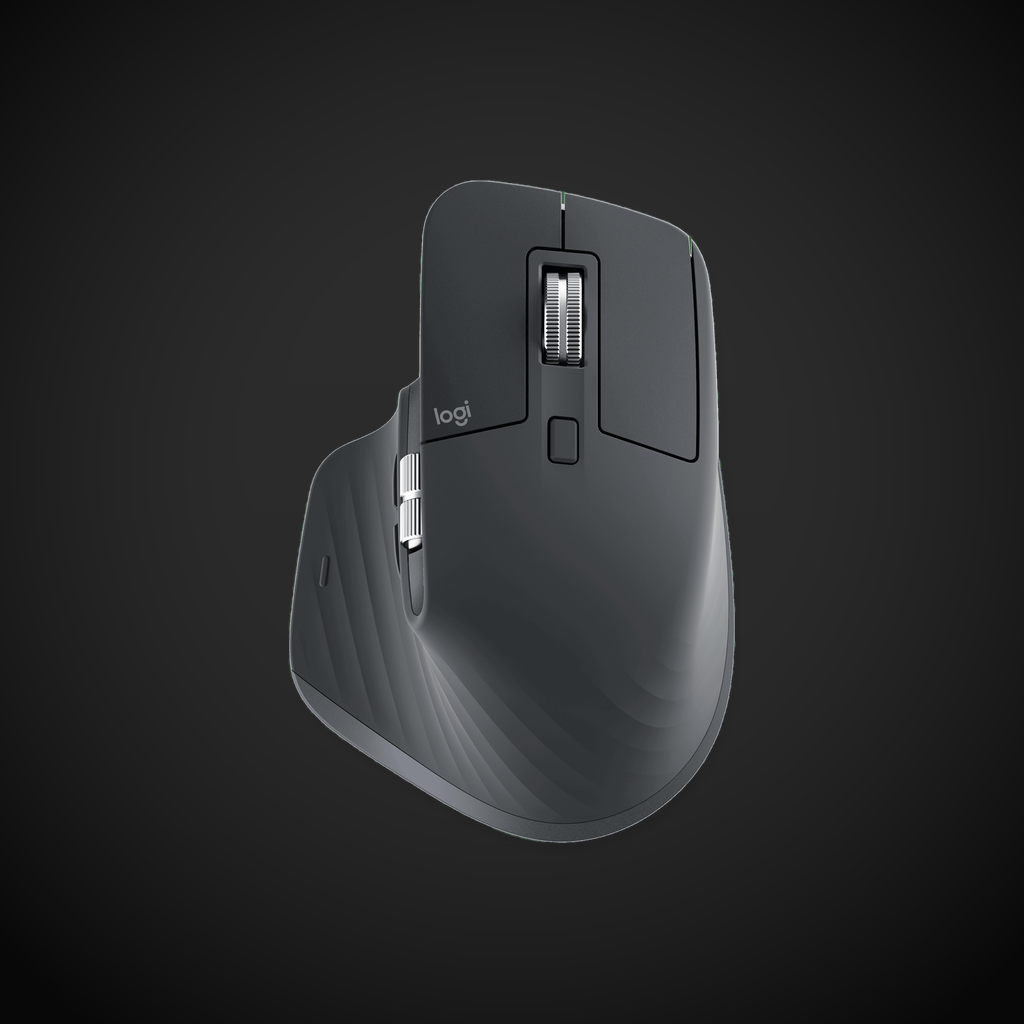
The MX Master 3S retains the sculpted, right-handed ergonomic silhouette that fans of the series know well, with a soft-touch matte finish available in Graphite or Pale Gray. At 141 grams, it feels substantial and planted on the desk, though the weight can be fatiguing during extended use compared to lighter office mice. The machined steel MagSpeed scroll wheel and dedicated thumb wheel for horizontal scrolling add a tangible sense of quality, while the 27% post-consumer recycled plastic construction shows Logitech’s commitment to sustainability. Every surface is contoured to support a palm grip, with a pronounced thumb rest that makes eight-hour workdays genuinely comfortable for medium to large hands.
Performance
The 8000 DPI Darkfield optical sensor tracks flawlessly on virtually any surface, including glass tables up to 4mm thick, which is a game-changer for users who work on unconventional desks or in coffee shops. The MagSpeed electromagnetic scroll wheel is the standout feature, offering two modes: a clicky ratchet for precise line-by-line navigation and a hyper-fast free-spin mode that tears through 1000 lines per second. Quiet Clicks reduce left and right button noise by 90 percent compared to the MX Master 3, delivering satisfying tactile feedback without disturbing coworkers or family members in quiet environments.
Features
Logitech Flow: Logitech Flow allows seamless cross-computer control, letting you move the cursor between up to three devices and even copy-paste files across them as if they shared a single monitor. Thumb Wheel: The thumb wheel provides intuitive horizontal scrolling for spreadsheets, timelines in video editing software, and wide web pages, though its placement takes some time to adjust to. Battery Life: The rechargeable battery delivers up to 70 days of use on a full charge, and a quick three-minute USB-C top-up provides an entire day of power when you are in a hurry. Logi Options+: Logi Options+ software unlocks deep customization for all seven buttons, gesture controls, and application-specific profiles, but it is noticeably resource-heavy compared to lighter alternatives.
Pros
- MagSpeed electromagnetic scroll wheel is top-tier with satisfying ratchet mode and lightning-fast free-spin that stops on a pixel when you flick it
- 8000 DPI Darkfield sensor tracks flawlessly on glass tables up to 4mm thick, eliminating the need for a mousepad entirely
- Logitech Flow cross-computer control enables effortless multi-device workflows with cursor transfer and file drag-and-drop across Windows and macOS
- Quiet Clicks reduce button noise by 90 percent compared to MX Master 3 while preserving the same tactile snap
- 70-day battery life on a 500mAh cell with USB-C fast charging (3-minute charge for a full day)
- Sculpted right-handed ergonomic shape with pronounced thumb rest stays comfortable for 8+ hour workdays
- Dedicated thumb wheel adds genuine utility for horizontal scrolling in Excel timelines, video editing, and wide web pages
Cons
- 141-gram weight is heavy compared to 96g MX Anywhere 3S and can cause fatigue during extended dragging sessions
- $79 price point, while down from $99 MSRP, is still steep versus the $40-$50 Logi M720 Triathlon and Razer Pro Click
- Logi Options+ software consumes 200-400MB RAM and occasionally hangs during profile switching
- Thumb wheel placement sits farther forward than expected and requires a deliberate adjustment period to use without thinking
- 125Hz USB polling rate and 14ms click latency make it unsuitable for gaming versus any dedicated gaming mouse
- Right-hand-only design excludes left-handed users entirely with no symmetrical alternative available
- No onboard dongle storage means the Logi Bolt receiver is easy to lose during travel
Verdict
The Logitech MX Master 3S earns its reputation as the king of productivity mice, combining an exceptional scroll wheel, flawless surface tracking, and genuine workflow-enhancing features like Flow and the thumb wheel. The high weight, hefty price, and resource-heavy software are real drawbacks, but none of them overshadow what the mouse does exceptionally well for office work, coding, and creative tasks. If you spend your days at a desk and want a mouse that disappears into your workflow rather than getting in the way, the MX Master 3S is an easy recommendation at 9.0/10. In the premium productivity mouse category, it stands alone: the Apple Magic Mouse lacks ergonomics and USB-C (without dongle), the Razer Pro Click Ultra has shorter battery life, and the Logitech MX Anywhere 3S is too small for palm grips. The MX Master 3S is the only mouse that combines a MagSpeed wheel, Darkfield glass tracking, and Flow multi-device support in one package, making it uniquely suited for creative professionals and developers who work across multiple computers.
Sources
- Logitech MX Master 3S Product Page - Logitech - logitech.com
- Logitech MX Master 3S Business Specs - Logitech - logitech.com
- Logitech MX Master 3S Review - Trusted Reviews - trustedreviews.com
- Logitech MX Master 3S on Amazon - amazon.com
Technical Specifications
How We Scored This Product
Every product on ComfyTechCheck is scored on a 1 to 10 scale across four criteria. Each criterion is weighted differently depending on the product category to reflect what matters most to real buyers.
- Performance & Capabilities 40% Speed, accuracy, quality of output in its category.
- Build & Design Quality 30% Materials, construction quality, durability, form factor.
- Consumer Value 20% Price-to-performance ratio relative to direct competitors.
- User Experience 10% Ease of setup, daily usability, comfort, ergonomics.
Scores are assigned by our editorial team after hands-on testing or extensive research using verified user reports, expert analysis, and technical specifications. For the full weight breakdown by category, visit our How We Rate page.